UI / UX Design
HNI Relationship Manager App
A premium mobile app for wealth banking RMs, designed around real-time transaction alerts that turn account activity into proactive client conversations. Includes design decisions, accessibility, and pilot feedback.
Year :
2024
Industry :
Digital Banking / Wealth Management
Client :
Indian Bank
Project Overview :
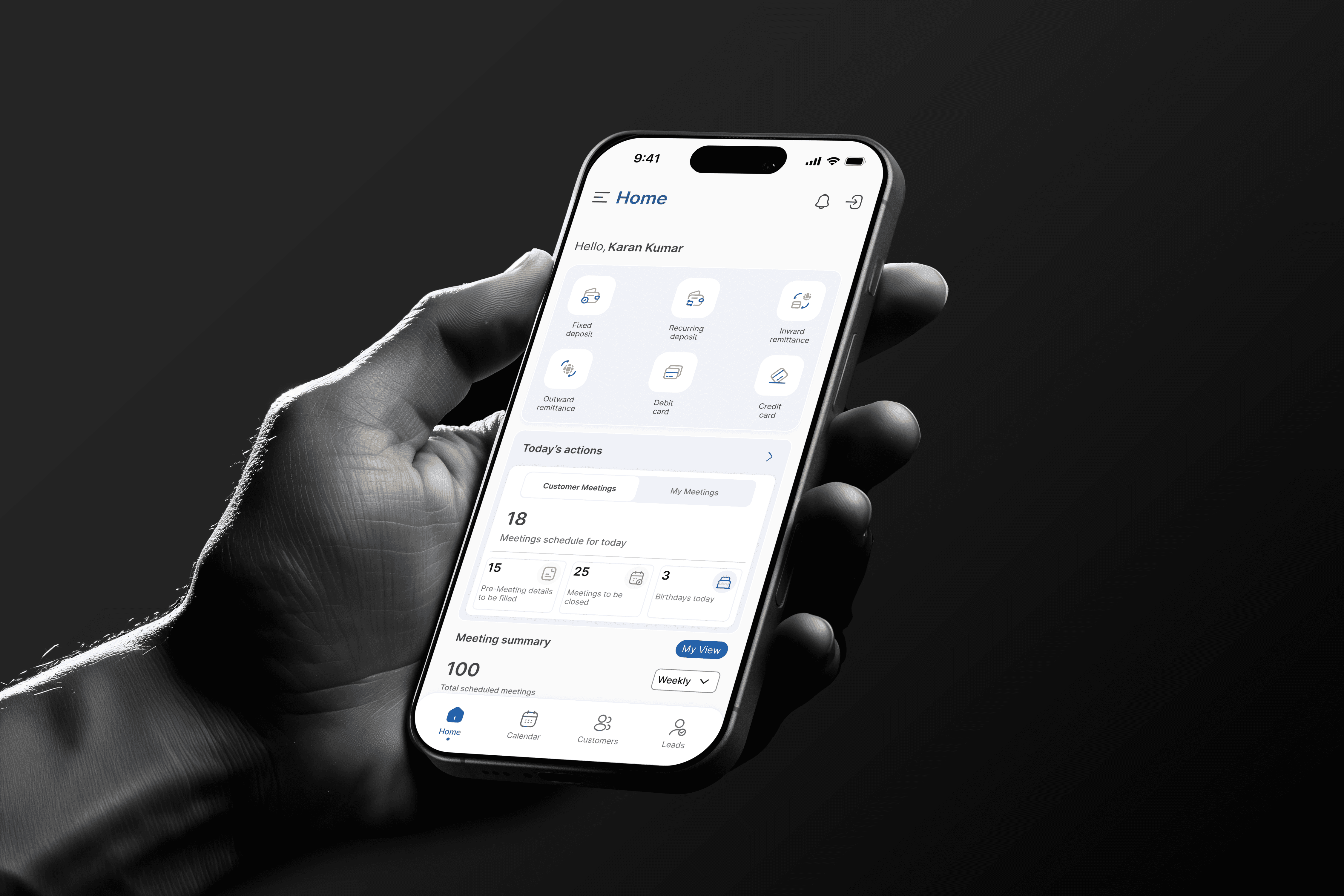
The HNI Relationship Manager (RM) Mobile Application was designed to help Relationship Managers manage and engage High-Net-Worth Individual (HNI) clients more efficiently.
The app enables RMs to:
Access complete details of each client’s profile, including assets, investment portfolios, and account activities.
Raise requests to add new HNI clients for approval through the internal system.
Track tasks, meetings, and follow-ups seamlessly.
Receive real-time notifications when large transactions occur, allowing them to proactively pitch relevant financial products or services.
Stay organized with alerts, reminders, and performance insights.

Note : This user flow is a generalized representation of the actual process. Specific steps and system details have been intentionally omitted
Note : This user flow is a generalized representation of the actual process. Specific steps and system details have been intentionally omitted
Note : This user flow is a generalized representation of the actual process. Specific steps and system details have been intentionally omitted
THE PROBLEM
A Relationship Manager serving High Net Worth clients has a narrow window to be useful. Their client just moved ₹2 crore into a fixed deposit, or liquidated a large equity position, or received a large inward transfer. For about 24 hours, that event is relevant. After that, it's just history.
Before this app, RMs found out about these events the same way they found out about anything else: by manually checking, days later, if they checked at all. The moment to call the client and say, "I noticed you just liquidated your XYZ position. Have you thought about where that capital goes next?" had already passed. That's not just a missed task. For a wealth bank, that's a missed revenue opportunity and a missed signal of attentiveness, the exact thing HNI clients are paying premium relationship fees for.
The brief I was given: Design a mobile first platform giving RMs a single source of truth for each client's financial position, with real time visibility into account activity so RMs can act on opportunities while they're still opportunities.
What made this genuinely hard: The product needed to feel premium. HNI clients have high expectations, and RMs sometimes show the app on screen during meetings. But "premium" and "information dense" are often in tension. I had to design something that felt calm and high end while surfacing time sensitive financial signals that demanded immediate attention. Those two goals pull against each other, and resolving that tension was the core design problem.
UNDERSTANDING THE USERS
The Business Analyst team ran detailed workshops with RM teams to map existing workflows and pain points. When I reviewed their findings, one detail reframed the entire project for me: RMs weren't asking for more data. They already had access to most of it, scattered across systems, but accessible. What they actually lacked was timing. They had the right information at the wrong moment, or the wrong moment for the right information.
This shifted my framing from "build a dashboard" to "build a timing system that happens to have a dashboard in it." Three findings shaped this:
Finding 1: The alert was the product, not a feature of the product.
RMs described missing high value transaction events as their single biggest frustration, not because the data was unavailable, but because nothing told them to look at it now. A notification that arrives 3 days late has roughly the same value as no notification.
Finding 2: Meeting prep anxiety was about completeness, not access.
RMs already had ways to pull client data before a meeting. What they lacked was confidence that what they pulled was current. Several described double checking figures through a colleague before a meeting "just in case" the data was stale. That's a trust problem, not an access problem, and trust problems are solved by design, not just by data pipes.
Finding 3: "Raise a request" workflows needed to feel like progress, not paperwork.
New client onboarding requests went into a black box once submitted. RMs had no visibility into status, which made them reluctant to use the feature, defeating the purpose of digitising it.
I sat in on one RM review session directly, which surfaced something the written research hadn't: RMs cared enormously about not looking like they were checking a screen during a client meeting. The interface needed to be glanceable, readable in under 2 seconds, because that's the maximum time an RM can look at their phone without it feeling rude.

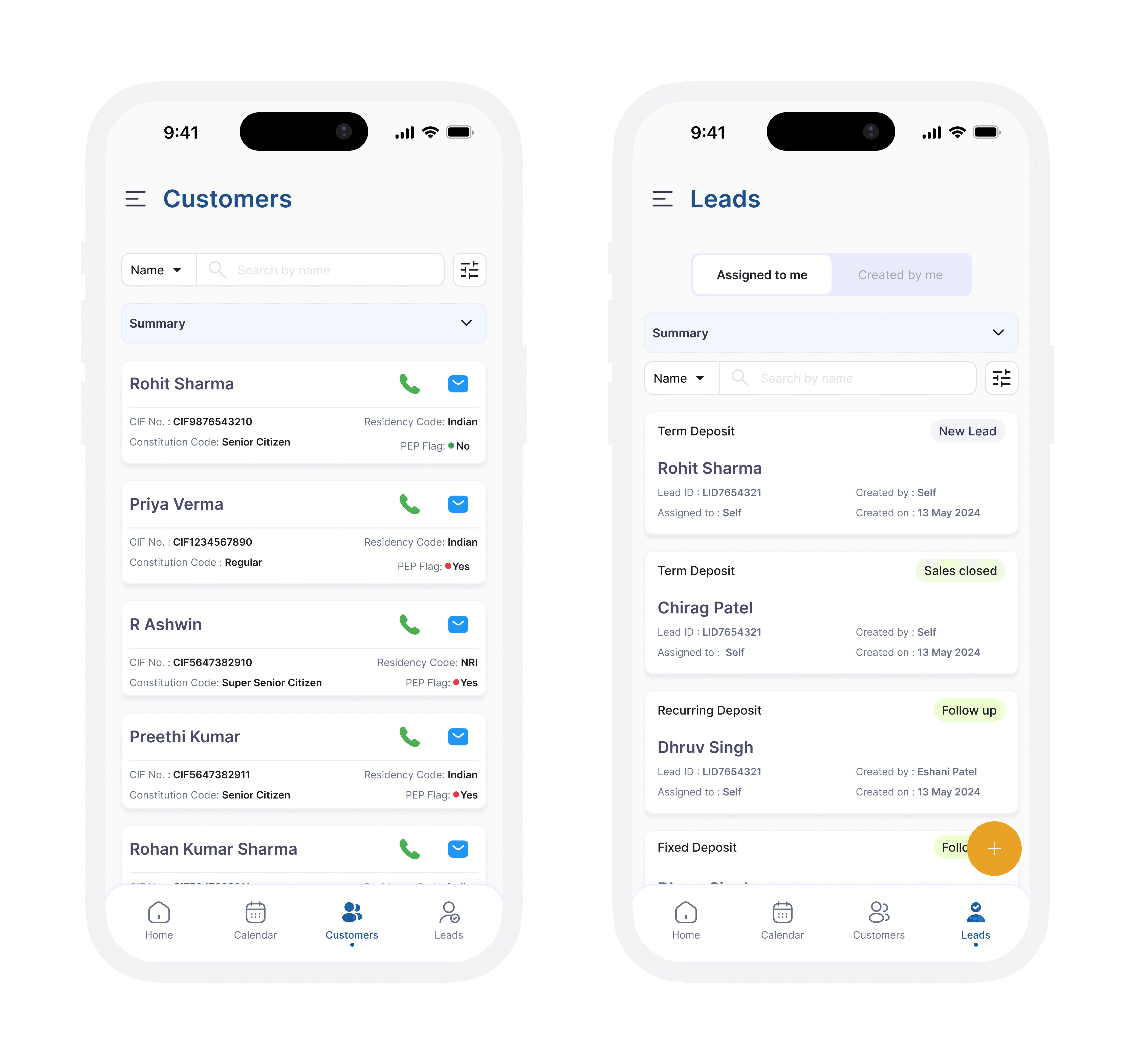
Note : Design screens have been recreated for portfolio purposes. Original confidential UI has been omitted
Note : Design screens have been recreated for portfolio purposes. Original confidential UI has been omitted
THE DESIGN DECISIONS THAT MATTERED
Decision 1: Alerts should tell RMs what to do, not just what happened
The biggest decision was rethinking alerts. A basic notification saying "Large transaction detected" would tell the RM something happened, but not what action to take.
Instead, I designed alerts that included both the transaction details and a suggested conversation topic. For example, if a fixed deposit matured, the alert might suggest discussing renewal options or alternative investment products.
This required extra work behind the scenes, but it made the alert immediately useful. The goal was to reduce the thinking required from the RM and help them act quickly.
Decision 2: A dashboard built for a quick glance
RMs often check information during client meetings, so the dashboard had to be readable in just a few seconds.
I focused on showing the three most important pieces of information upfront: portfolio value, recent activity, and pending action items. These could be viewed without scrolling or tapping.
To test this, I showed screens to colleagues for two seconds and asked what they remembered. The final design used a clear visual hierarchy so the most important information stood out instantly.
Decision 3: Status visibility for the "raise a request" workflow
RMs avoided the new-client request feature because submitted requests disappeared into silence. Rather than just adding a status field, I designed a visible request tracker — every submitted request appears in a persistent "My Requests" list with a clear status (Submitted → Under Review → Approved/Action Needed), and any status change triggers a notification to the RM.
This was a small addition in terms of screens, but it directly addressed the trust gap that was causing RMs to avoid the feature entirely. Visibility, not just functionality, was the fix.
Decision 4: Creating a premium experience without losing important information
The app needed to feel professional enough to be shown during client meetings while still displaying a lot of information.
I used a refined colour palette, clear spacing, and strong typography to highlight the most important data. This made the screens feel calm and premium without sacrificing detail.
Several RMs commented that the app felt more like a client facing product than an internal banking tool, which was exactly the outcome we wanted.
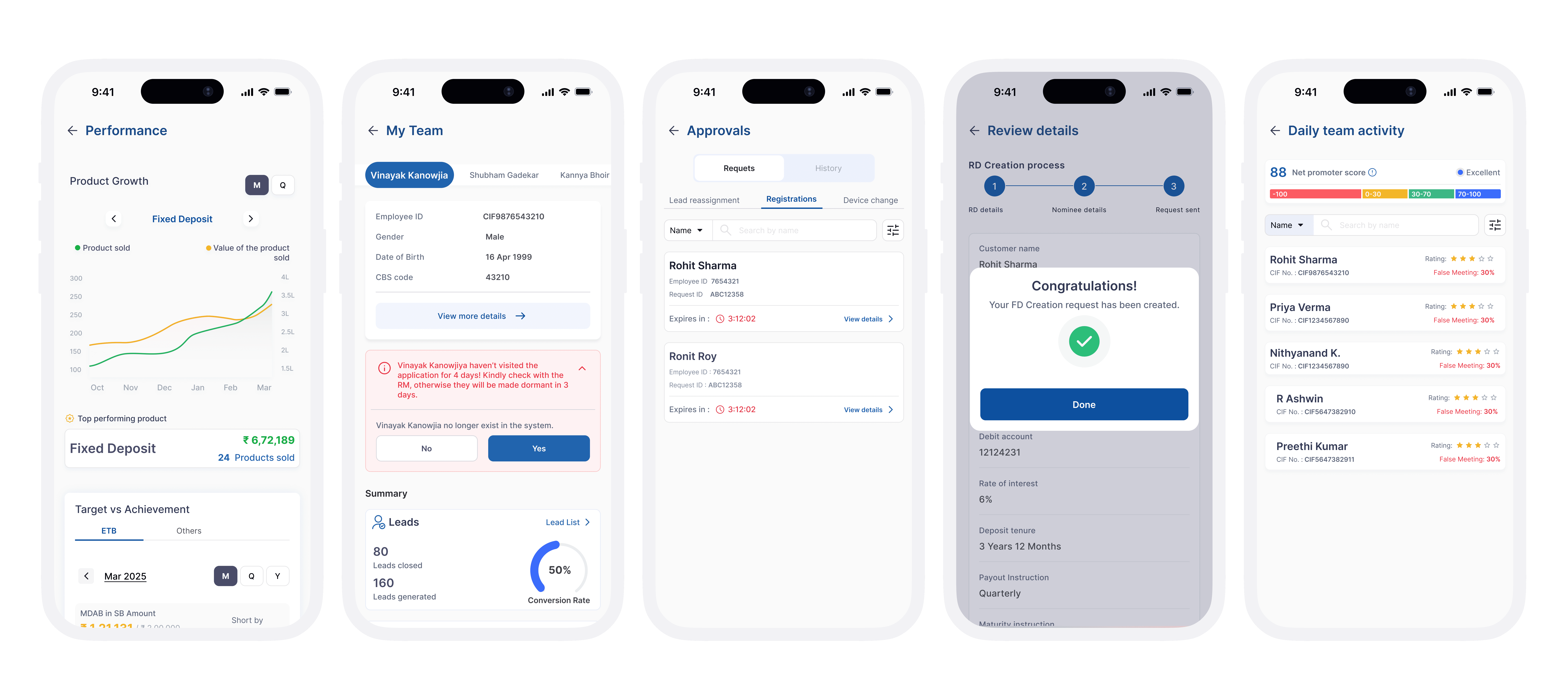

Note : Design screens have been recreated for portfolio purposes. Original confidential UI has been omitted
Note : Design screens have been recreated for portfolio purposes. Original confidential UI has been omitted
Outcomes :
The app went through three rounds of review with RM stakeholders before pilot rollout. Specific observed outcomes from pilot feedback:
One senior RM described the alert with suggestion feature directly: "It's the first time the bank's tech has told me what to say, not just what happened." That distinction, between information and guidance, was exactly the gap the design was meant to close.
RMs in the pilot group reported responding to high value transaction events on the same day, compared to a lag of several days previously. While this wasn't formally instrumented, it was consistently mentioned across review sessions.
During one review session, an RM pulled up the client dashboard mid meeting on their own initiative to show a client their portfolio summary. The team noted that this had never happened with the previous tool and that the visual design was specifically built to support this behavior.
More Projects



UI / UX Design
HNI Relationship Manager App
A premium mobile app for wealth banking RMs, designed around real-time transaction alerts that turn account activity into proactive client conversations. Includes design decisions, accessibility, and pilot feedback.
Year :
2024
Industry :
Digital Banking / Wealth Management
Client :
Indian Bank
Project Overview :
The HNI Relationship Manager (RM) Mobile Application was designed to help Relationship Managers manage and engage High-Net-Worth Individual (HNI) clients more efficiently.
The app enables RMs to:
Access complete details of each client’s profile, including assets, investment portfolios, and account activities.
Raise requests to add new HNI clients for approval through the internal system.
Track tasks, meetings, and follow-ups seamlessly.
Receive real-time notifications when large transactions occur, allowing them to proactively pitch relevant financial products or services.
Stay organized with alerts, reminders, and performance insights.
Note : This user flow is a generalized representation of the actual process. Specific steps and system details have been intentionally omitted
Note : This user flow is a generalized representation of the actual process. Specific steps and system details have been intentionally omitted
Note : This user flow is a generalized representation of the actual process. Specific steps and system details have been intentionally omitted
THE PROBLEM
A Relationship Manager serving High Net Worth clients has a narrow window to be useful. Their client just moved ₹2 crore into a fixed deposit, or liquidated a large equity position, or received a large inward transfer. For about 24 hours, that event is relevant. After that, it's just history.
Before this app, RMs found out about these events the same way they found out about anything else: by manually checking, days later, if they checked at all. The moment to call the client and say, "I noticed you just liquidated your XYZ position. Have you thought about where that capital goes next?" had already passed. That's not just a missed task. For a wealth bank, that's a missed revenue opportunity and a missed signal of attentiveness, the exact thing HNI clients are paying premium relationship fees for.
The brief I was given: Design a mobile first platform giving RMs a single source of truth for each client's financial position, with real time visibility into account activity so RMs can act on opportunities while they're still opportunities.
What made this genuinely hard: The product needed to feel premium. HNI clients have high expectations, and RMs sometimes show the app on screen during meetings. But "premium" and "information dense" are often in tension. I had to design something that felt calm and high end while surfacing time sensitive financial signals that demanded immediate attention. Those two goals pull against each other, and resolving that tension was the core design problem.
UNDERSTANDING THE USERS
The Business Analyst team ran detailed workshops with RM teams to map existing workflows and pain points. When I reviewed their findings, one detail reframed the entire project for me: RMs weren't asking for more data. They already had access to most of it, scattered across systems, but accessible. What they actually lacked was timing. They had the right information at the wrong moment, or the wrong moment for the right information.
This shifted my framing from "build a dashboard" to "build a timing system that happens to have a dashboard in it." Three findings shaped this:
Finding 1: The alert was the product, not a feature of the product.
RMs described missing high value transaction events as their single biggest frustration, not because the data was unavailable, but because nothing told them to look at it now. A notification that arrives 3 days late has roughly the same value as no notification.
Finding 2: Meeting prep anxiety was about completeness, not access.
RMs already had ways to pull client data before a meeting. What they lacked was confidence that what they pulled was current. Several described double checking figures through a colleague before a meeting "just in case" the data was stale. That's a trust problem, not an access problem, and trust problems are solved by design, not just by data pipes.
Finding 3: "Raise a request" workflows needed to feel like progress, not paperwork.
New client onboarding requests went into a black box once submitted. RMs had no visibility into status, which made them reluctant to use the feature, defeating the purpose of digitising it.
I sat in on one RM review session directly, which surfaced something the written research hadn't: RMs cared enormously about not looking like they were checking a screen during a client meeting. The interface needed to be glanceable, readable in under 2 seconds, because that's the maximum time an RM can look at their phone without it feeling rude.
Note : Design screens have been recreated for portfolio purposes. Original confidential UI has been omitted
Note : Design screens have been recreated for portfolio purposes. Original confidential UI has been omitted
THE DESIGN DECISIONS THAT MATTERED
Decision 1: Alerts should tell RMs what to do, not just what happened
The biggest decision was rethinking alerts. A basic notification saying "Large transaction detected" would tell the RM something happened, but not what action to take.
Instead, I designed alerts that included both the transaction details and a suggested conversation topic. For example, if a fixed deposit matured, the alert might suggest discussing renewal options or alternative investment products.
This required extra work behind the scenes, but it made the alert immediately useful. The goal was to reduce the thinking required from the RM and help them act quickly.
Decision 2: A dashboard built for a quick glance
RMs often check information during client meetings, so the dashboard had to be readable in just a few seconds.
I focused on showing the three most important pieces of information upfront: portfolio value, recent activity, and pending action items. These could be viewed without scrolling or tapping.
To test this, I showed screens to colleagues for two seconds and asked what they remembered. The final design used a clear visual hierarchy so the most important information stood out instantly.
Decision 3: Status visibility for the "raise a request" workflow
RMs avoided the new-client request feature because submitted requests disappeared into silence. Rather than just adding a status field, I designed a visible request tracker — every submitted request appears in a persistent "My Requests" list with a clear status (Submitted → Under Review → Approved/Action Needed), and any status change triggers a notification to the RM.
This was a small addition in terms of screens, but it directly addressed the trust gap that was causing RMs to avoid the feature entirely. Visibility, not just functionality, was the fix.
Decision 4: Creating a premium experience without losing important information
The app needed to feel professional enough to be shown during client meetings while still displaying a lot of information.
I used a refined colour palette, clear spacing, and strong typography to highlight the most important data. This made the screens feel calm and premium without sacrificing detail.
Several RMs commented that the app felt more like a client facing product than an internal banking tool, which was exactly the outcome we wanted.
Note : Design screens have been recreated for portfolio purposes. Original confidential UI has been omitted
Note : Design screens have been recreated for portfolio purposes. Original confidential UI has been omitted
Outcomes :
The app went through three rounds of review with RM stakeholders before pilot rollout. Specific observed outcomes from pilot feedback:
One senior RM described the alert with suggestion feature directly: "It's the first time the bank's tech has told me what to say, not just what happened." That distinction, between information and guidance, was exactly the gap the design was meant to close.
RMs in the pilot group reported responding to high value transaction events on the same day, compared to a lag of several days previously. While this wasn't formally instrumented, it was consistently mentioned across review sessions.
During one review session, an RM pulled up the client dashboard mid meeting on their own initiative to show a client their portfolio summary. The team noted that this had never happened with the previous tool and that the visual design was specifically built to support this behavior.
More Projects
UI / UX Design
HNI Relationship Manager App
A premium mobile app for wealth banking RMs, designed around real-time transaction alerts that turn account activity into proactive client conversations. Includes design decisions, accessibility, and pilot feedback.
Year :
2024
Industry :
Digital Banking / Wealth Management
Client :
Indian Bank
Project Overview :
The HNI Relationship Manager (RM) Mobile Application was designed to help Relationship Managers manage and engage High-Net-Worth Individual (HNI) clients more efficiently.
The app enables RMs to:
Access complete details of each client’s profile, including assets, investment portfolios, and account activities.
Raise requests to add new HNI clients for approval through the internal system.
Track tasks, meetings, and follow-ups seamlessly.
Receive real-time notifications when large transactions occur, allowing them to proactively pitch relevant financial products or services.
Stay organized with alerts, reminders, and performance insights.
Note : This user flow is a generalized representation of the actual process. Specific steps and system details have been intentionally omitted
Note : This user flow is a generalized representation of the actual process. Specific steps and system details have been intentionally omitted
Note : This user flow is a generalized representation of the actual process. Specific steps and system details have been intentionally omitted
THE PROBLEM
A Relationship Manager serving High Net Worth clients has a narrow window to be useful. Their client just moved ₹2 crore into a fixed deposit, or liquidated a large equity position, or received a large inward transfer. For about 24 hours, that event is relevant. After that, it's just history.
Before this app, RMs found out about these events the same way they found out about anything else: by manually checking, days later, if they checked at all. The moment to call the client and say, "I noticed you just liquidated your XYZ position. Have you thought about where that capital goes next?" had already passed. That's not just a missed task. For a wealth bank, that's a missed revenue opportunity and a missed signal of attentiveness, the exact thing HNI clients are paying premium relationship fees for.
The brief I was given: Design a mobile first platform giving RMs a single source of truth for each client's financial position, with real time visibility into account activity so RMs can act on opportunities while they're still opportunities.
What made this genuinely hard: The product needed to feel premium. HNI clients have high expectations, and RMs sometimes show the app on screen during meetings. But "premium" and "information dense" are often in tension. I had to design something that felt calm and high end while surfacing time sensitive financial signals that demanded immediate attention. Those two goals pull against each other, and resolving that tension was the core design problem.
UNDERSTANDING THE USERS
The Business Analyst team ran detailed workshops with RM teams to map existing workflows and pain points. When I reviewed their findings, one detail reframed the entire project for me: RMs weren't asking for more data. They already had access to most of it, scattered across systems, but accessible. What they actually lacked was timing. They had the right information at the wrong moment, or the wrong moment for the right information.
This shifted my framing from "build a dashboard" to "build a timing system that happens to have a dashboard in it." Three findings shaped this:
Finding 1: The alert was the product, not a feature of the product.
RMs described missing high value transaction events as their single biggest frustration, not because the data was unavailable, but because nothing told them to look at it now. A notification that arrives 3 days late has roughly the same value as no notification.
Finding 2: Meeting prep anxiety was about completeness, not access.
RMs already had ways to pull client data before a meeting. What they lacked was confidence that what they pulled was current. Several described double checking figures through a colleague before a meeting "just in case" the data was stale. That's a trust problem, not an access problem, and trust problems are solved by design, not just by data pipes.
Finding 3: "Raise a request" workflows needed to feel like progress, not paperwork.
New client onboarding requests went into a black box once submitted. RMs had no visibility into status, which made them reluctant to use the feature, defeating the purpose of digitising it.
I sat in on one RM review session directly, which surfaced something the written research hadn't: RMs cared enormously about not looking like they were checking a screen during a client meeting. The interface needed to be glanceable, readable in under 2 seconds, because that's the maximum time an RM can look at their phone without it feeling rude.
Note : Design screens have been recreated for portfolio purposes. Original confidential UI has been omitted
Note : Design screens have been recreated for portfolio purposes. Original confidential UI has been omitted
THE DESIGN DECISIONS THAT MATTERED
Decision 1: Alerts should tell RMs what to do, not just what happened
The biggest decision was rethinking alerts. A basic notification saying "Large transaction detected" would tell the RM something happened, but not what action to take.
Instead, I designed alerts that included both the transaction details and a suggested conversation topic. For example, if a fixed deposit matured, the alert might suggest discussing renewal options or alternative investment products.
This required extra work behind the scenes, but it made the alert immediately useful. The goal was to reduce the thinking required from the RM and help them act quickly.
Decision 2: A dashboard built for a quick glance
RMs often check information during client meetings, so the dashboard had to be readable in just a few seconds.
I focused on showing the three most important pieces of information upfront: portfolio value, recent activity, and pending action items. These could be viewed without scrolling or tapping.
To test this, I showed screens to colleagues for two seconds and asked what they remembered. The final design used a clear visual hierarchy so the most important information stood out instantly.
Decision 3: Status visibility for the "raise a request" workflow
RMs avoided the new-client request feature because submitted requests disappeared into silence. Rather than just adding a status field, I designed a visible request tracker — every submitted request appears in a persistent "My Requests" list with a clear status (Submitted → Under Review → Approved/Action Needed), and any status change triggers a notification to the RM.
This was a small addition in terms of screens, but it directly addressed the trust gap that was causing RMs to avoid the feature entirely. Visibility, not just functionality, was the fix.
Decision 4: Creating a premium experience without losing important information
The app needed to feel professional enough to be shown during client meetings while still displaying a lot of information.
I used a refined colour palette, clear spacing, and strong typography to highlight the most important data. This made the screens feel calm and premium without sacrificing detail.
Several RMs commented that the app felt more like a client facing product than an internal banking tool, which was exactly the outcome we wanted.
Note : Design screens have been recreated for portfolio purposes. Original confidential UI has been omitted
Note : Design screens have been recreated for portfolio purposes. Original confidential UI has been omitted
Outcomes :
The app went through three rounds of review with RM stakeholders before pilot rollout. Specific observed outcomes from pilot feedback:
One senior RM described the alert with suggestion feature directly: "It's the first time the bank's tech has told me what to say, not just what happened." That distinction, between information and guidance, was exactly the gap the design was meant to close.
RMs in the pilot group reported responding to high value transaction events on the same day, compared to a lag of several days previously. While this wasn't formally instrumented, it was consistently mentioned across review sessions.
During one review session, an RM pulled up the client dashboard mid meeting on their own initiative to show a client their portfolio summary. The team noted that this had never happened with the previous tool and that the visual design was specifically built to support this behavior.