UI / UX Design
HNI Admin Web Platform — Enterprise UX Case Study
An internal banking platform for Zonal, FGMO and CO admins overseeing HNI Relationship Managers. Covers high-stakes monitoring design, data sensitivity decisions, dual approval workflow architecture, and compliance-aware UX for wealth management.
Year :
2024
Industry :
Fintech / Wealth Management
Client :
Indian Bank
Project Overview :
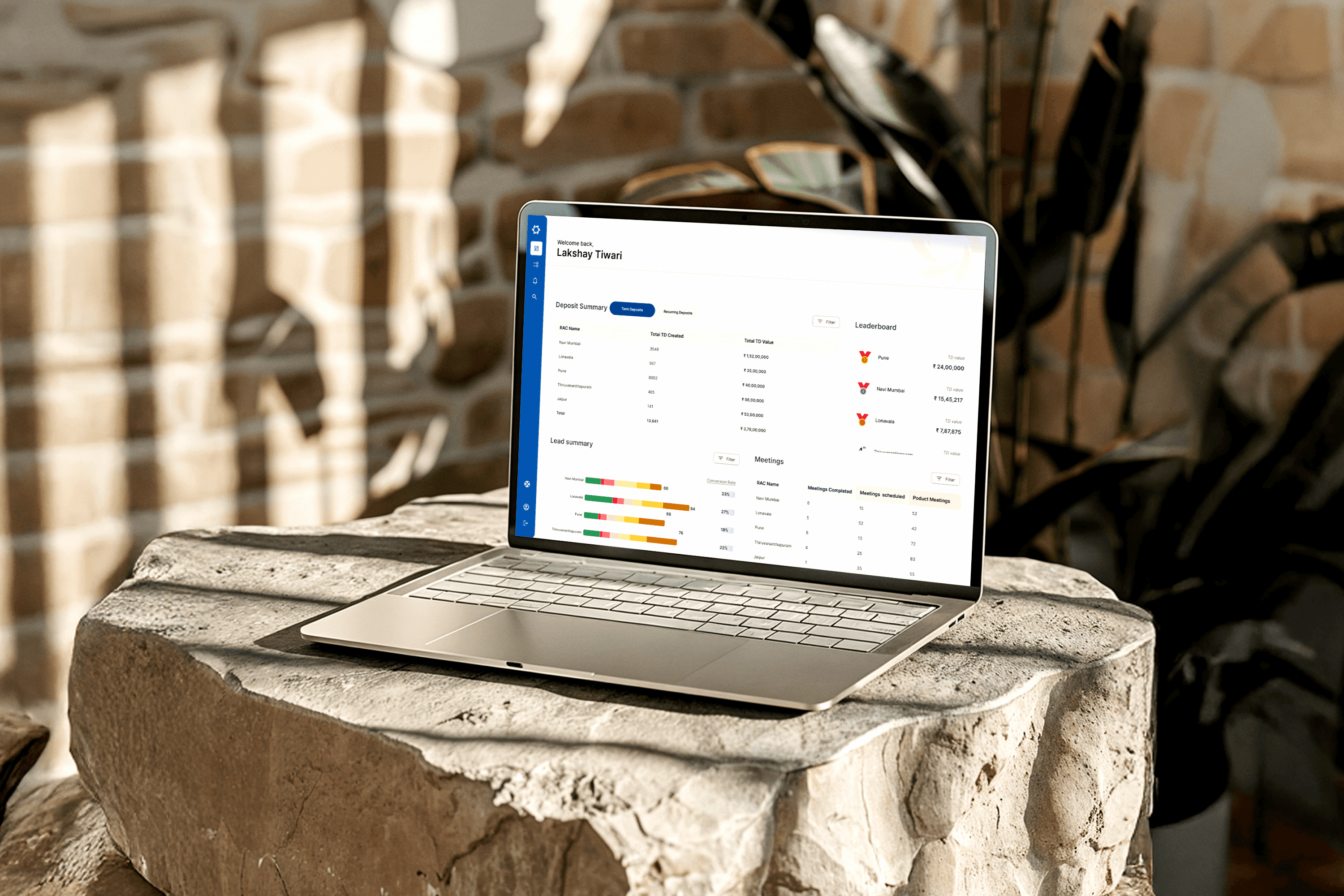
The HNI Admin Web Application was designed to help administrative teams at different levels — Zonal, FGMO, and CO (Super Admin) — effectively manage and monitor Relationship Managers (RMs) handling High-Net-Worth Individual (HNI) clients.
The platform acts as a central control system that enables admins to:
Track RM performance and client engagement activities.
Review and approve RM requests, such as adding new HNI clients.
Access detailed reports and analytics to understand productivity and relationship outcomes.
Monitor regional performance, ensuring goals and compliance standards are met.
Communicate and coordinate between hierarchical levels (Zonal → FGMO → CO).
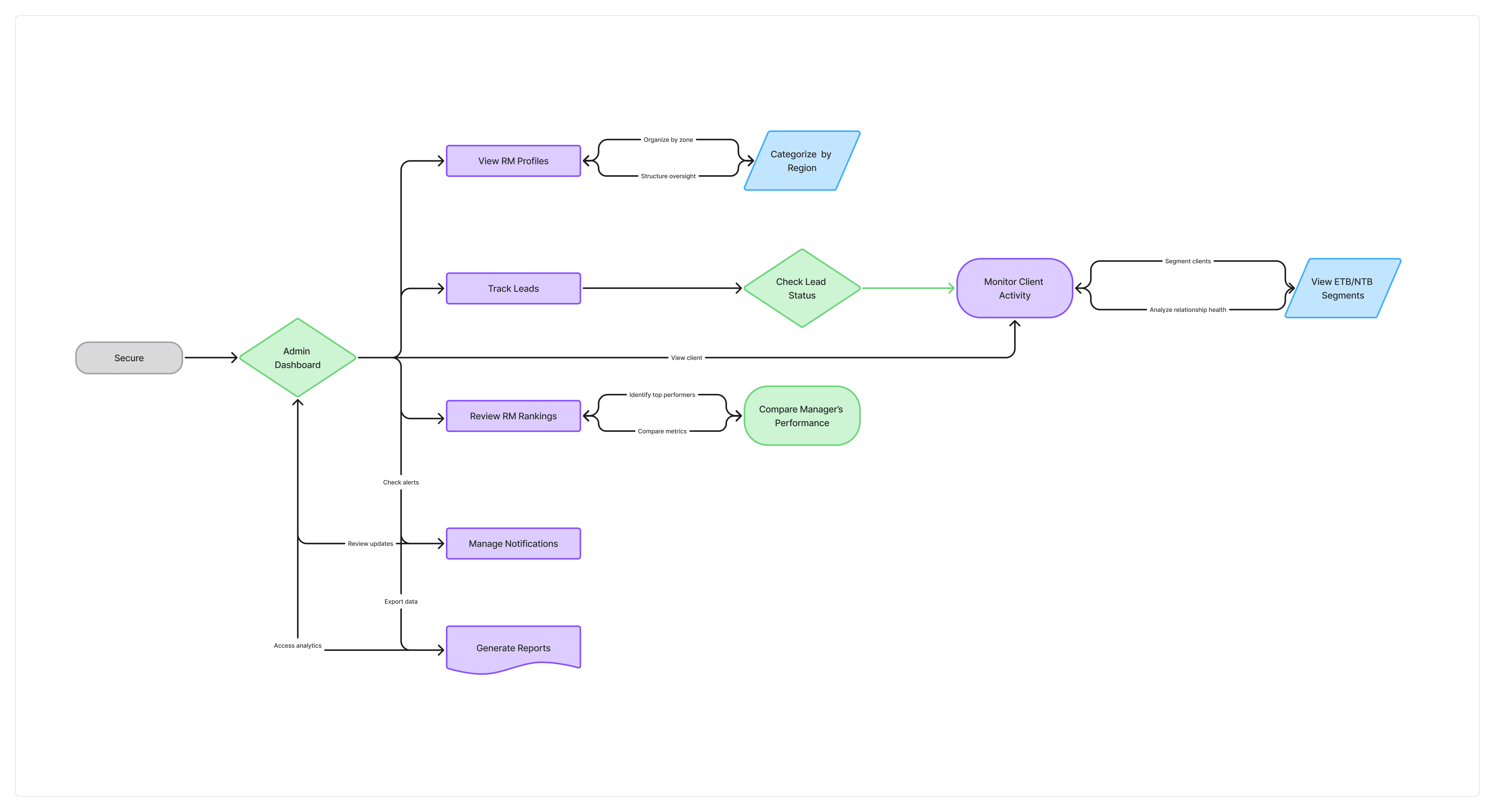
Note : This user flow is a generalized representation of the actual process. Specific steps and system details have been intentionally omitted
Note : This user flow is a generalized representation of the actual process. Specific steps and system details have been intentionally omitted
Note : This user flow is a generalized representation of the actual process. Specific steps and system details have been intentionally omitted
THE PROBLEM
Before this platform, HNI admin teams operated the same way MSME teams did — spreadsheets, email threads, manual performance tracking assembled periodically into reports. The difference is that in the HNI context, the lag between an event and an admin knowing about it carries proportionally higher cost.
Key operational failures I was briefed on:
A Zonal Admin could not see in real time whether an RM had followed up after a significant HNI client transaction — a critical window for proactive relationship management. By the time a weekly report surfaced the gap, the opportunity had passed.
RM and customer addition requests moved through unstructured approval chains with no documented criteria, no audit trail, and no visibility into where in the process a request was sitting. For high-value client additions with compliance implications, this was a structural risk.
Data about HNI clients — net worth, investment portfolios, transaction history — was accessible more broadly than required by operational need. Several features built for MSME admin contexts were initially proposed for this platform unchanged. I identified this as a problem early and pushed for a redesign of data access controls before the first screen was built.
The brief: Design a centralised platform that gives each admin tier real-time visibility into RM performance and HNI client activity — while enforcing stricter data boundaries than the MSME equivalent, and supporting two distinct approval workflows: one for RM management, one for customer list approvals.
UNDERSTANDING THE THREE ADMIN ROLES IN A WEALTH CONTEXT
The Business Analyst team conducted requirement sessions with stakeholders across all three admin levels. When I reviewed the findings, I was looking for one specific thing: how does the HNI context change what each role needs, compared to an MSME context? The answers shaped every structural decision I made.
Zonal Admin — monitoring relationship health, not just activity volume
In MSME admin, a Zonal Admin monitors RM throughput — how many clients visited, how many onboarding requests submitted, how many tasks completed. In HNI, those volume metrics are less meaningful. An RM managing 15 HNI clients might only have 3 meetings in a week — but the quality and follow-through of each one matters enormously.
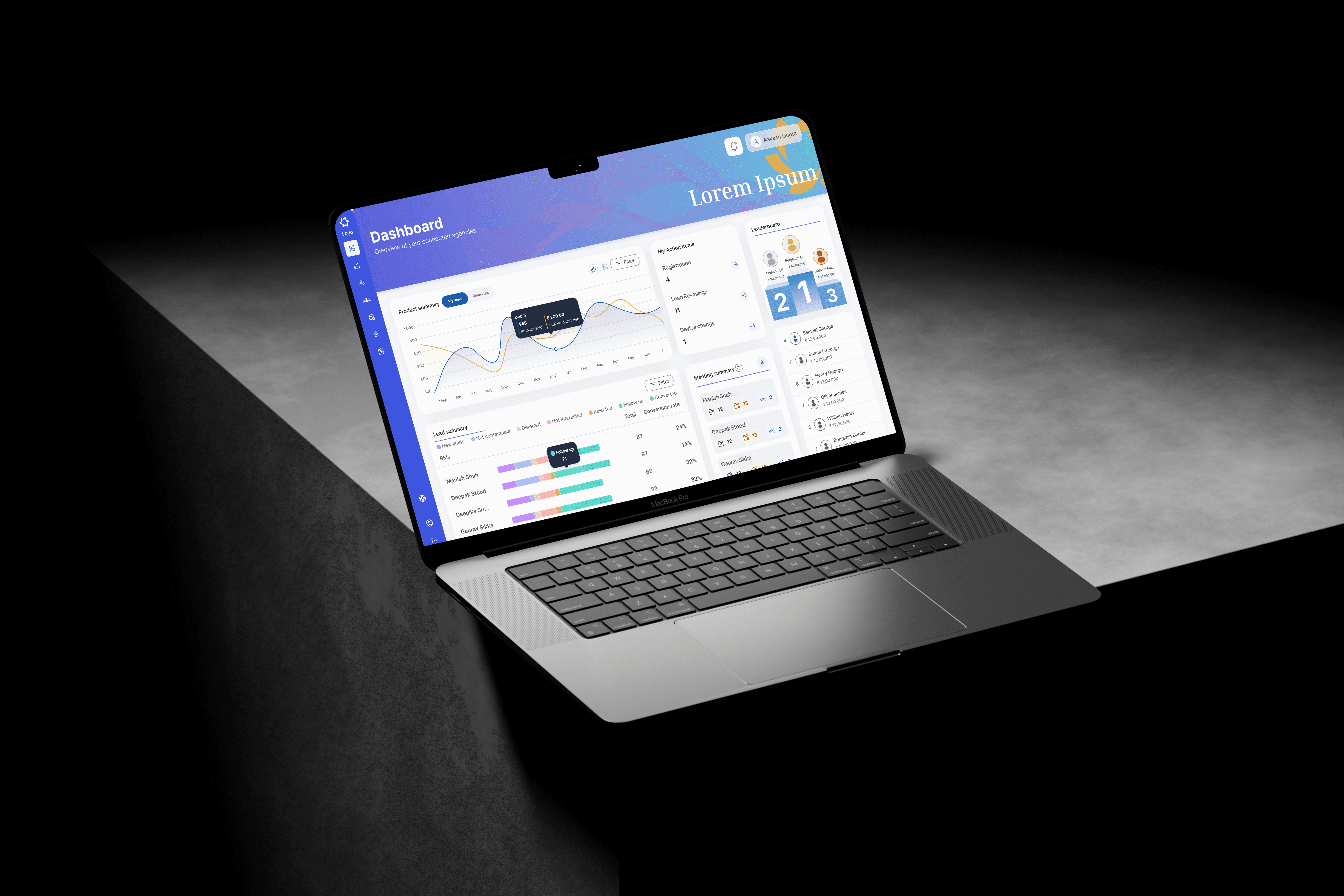
Zonal Admins in the HNI context needed to monitor relationship health signals: last interaction date per client, open follow-up items, response time to significant client activity. Not counts. Conditions. I restructured the Zonal dashboard around exception-first logic — surface the clients or RMs with a gap in activity, a missed follow-up, or an unresponded alert. Everything routine stays below the fold.
FGMO Admin — managing escalation risk, not just regional comparison
In MSME, FGMO Admins compare zones by performance volume — onboarding numbers, approval rates, RM activity scores. In HNI, the comparison dimension that matters most is escalation risk: which zones have open RM requests pending too long, which have HNI client additions awaiting approval beyond acceptable timelines, which have unresolved compliance flags.
The FGMO dashboard I designed leads with an escalation queue ranked by time-at-risk, rather than a performance comparison table. Performance metrics are present — but secondary to the exception surface that drives action.
CO Admin — strategic exposure and access governance
HNI client data is more sensitive, the CO Admin role includes managing which admin users can see which data tiers — not just organisational-wide analytics. I added a data access management module to the CO view specifically for this platform, absent from the MSME equivalent.


Note : Design screens have been recreated for portfolio purposes. Original confidential UI has been omitted
Note : Design screens have been recreated for portfolio purposes. Original confidential UI has been omitted
THE DESIGN DECISIONS THAT MATTERED
Decision 1: Rebuilding data visibility from operational need, not organisational rank
The most consequential design decision on this project happened before a single screen was built — and it was a decision to push back on the initial brief.
Several features proposed for this platform assumed that admin access should mirror the organisational hierarchy: more senior role means more data visibility. As a principle for permissions architecture, this is intuitive. As a principle for data access in a regulated wealth environment, it creates exposure risk.
I challenged the default and proposed an alternative principle: data access should match operational need, not organisational rank.
A Zonal Admin's operational need is to know whether a relationship event needs attention — not what the underlying financial figures are. An FGMO Admin's operational need is to identify escalation risk at zone level — not to review individual client portfolios. Only the CO Admin has an operational case for full financial data visibility, alongside the governance responsibility that justifies it.
Working with the BA team and admin stakeholders, I mapped each role's actual operational decisions against the data required to make them. This produced a tiered visibility model:
Zonal Admins see relationship health indicators — activity status, alert response, follow-up gaps — without access to client financial data [verify specific restrictions]
FGMO Admins see zone-level performance aggregates and escalation queues, with financial data visible at a threshold level rather than in full detail [verify]
CO Admins have full data visibility plus the access governance tools to manage what lower tiers can see
All data exports at FGMO and CO level require a logged reason-for-export, creating an audit record for every data extraction event
This pushback added two weeks to the project timeline due to additional stakeholder alignment. I made the case on both compliance and design grounds — compliance because uncontrolled access to HNI financial data creates regulatory risk, design because data that isn't needed creates cognitive noise that obscures the signals that are.
Decision 2: Two approval tracks — designed as parallel systems with distinct decision logic
This platform required two entirely separate approval workflows running simultaneously, each with different criteria, different stakeholders, and different compliance implications:
Track 1 — RM Management Approvals: Requests to add, reassign, or deactivate Relationship Managers. These decisions affect every client that RM manages — a wrong assignment or a delayed deactivation in a wealth management context carries downstream risk across an entire portfolio of high-value relationships.
Track 2 — Customer List Approvals: Requests to add new HNI clients to an RM's managed portfolio. These decisions involve client eligibility criteria, KYC completion status, portfolio fit assessment, and compliance sign-off — each of which needs to be documented for regulatory purposes.
The design challenge: both tracks move through the same admin hierarchy, use the same approval stages, and appear in the same interface. Without clear structural differentiation, an admin could apply RM-management thinking to a customer addition decision — or vice versa — with consequences in either direction.
I designed them as visually parallel but informationally distinct systems. The interface pattern is identical: submitted → under review → approved / returned with reason. The decision checklists, the data surfaces at each stage, and the required documentation fields are completely different — determined by the track type, which is persistently labelled throughout every stage of the workflow. Track type is never implied by content alone; it is always explicitly stated in the screen header.
Every decision in both tracks is logged with timestamp, admin identity, role level, and a mandatory rationale field — creating a complete audit trail visible to CO Admins and available for compliance review.
Decision 3: Exception-first architecture — designing for the outlier, not the average
Every admin dashboard in this platform leads with exceptions before summaries. This was a structural choice specific to the high-consequence nature of HNI oversight.
In high-volume environments, summary metrics are the right starting point — the aggregate tells you where attention is needed. In a low-volume, high-consequence environment, summary metrics can actively obscure the problem that most urgently needs attention. An RM managing fifteen well-maintained client relationships and one at-risk one looks entirely healthy in any aggregate view — until the at-risk relationship becomes a lost one.
I designed a persistent "Attention Required" panel at the top of every admin tier's landing view. It is populated by a prioritised exception surface: delayed RM follow-ups, unanswered client activity alerts, approval requests approaching SLA breach, and flagged relationship gaps. This panel is the first thing every admin sees when they open the platform. Performance summaries, analytics, and trend data sit below it and require a deliberate scroll.
This structure was not in the original brief. It emerged from listening carefully to how Zonal Admins described their day — they were not checking summaries and then finding problems. They were looking for problems, and everything else was secondary. The interface now reflects that.
Decision 4: A dedicated access governance module for CO Admins
The CO Admin view contains a module that has no equivalent at lower tiers: a data access management interface where CO Admins can review, adjust, and audit data visibility settings across the entire admin hierarchy.
In a regulated wealth management environment, the ability to control who sees what is not just an IT function — it is a governance function that belongs in the product. Historically this required IT tickets and multi-day turnarounds. I designed it as a first-class feature of the CO Admin experience: configurable visibility tiers, role-based access logs, and an audit history of every access change with timestamp and initiating admin.
The decision to include this was mine, proposed after reviewing the CO Admin requirements and identifying that access governance was described as a pain point but not included in the original feature scope. Getting it added required a conversation with the product team about scope — a conversation I initiated because I believed the absence of it would create a compliance gap that would surface post-launch.
Decision 5: Direct-to-high-fidelity — and how I managed the risk in a compliance-sensitive product
Skipping wireframes in a compliance-sensitive enterprise product carries specific risks: workflow logic errors and data access decisions are harder to catch once stakeholders have seen polished screens and formed mental sign-offs.
I addressed this through two practices. First, I ran a dedicated data access alignment session with the CO Admin representative and the BA team before any screen design began — the output was a written agreement on data visibility per role, against which every subsequent design decision could be checked. Second, I ran separate feedback sessions per admin tier throughout the process, specifically to prevent a lower-tier admin's preferences from anchoring the design of features they don't use. Zonal Admin feedback is valid for Zonal Admin screens. It is not valid input for CO Admin access governance design.


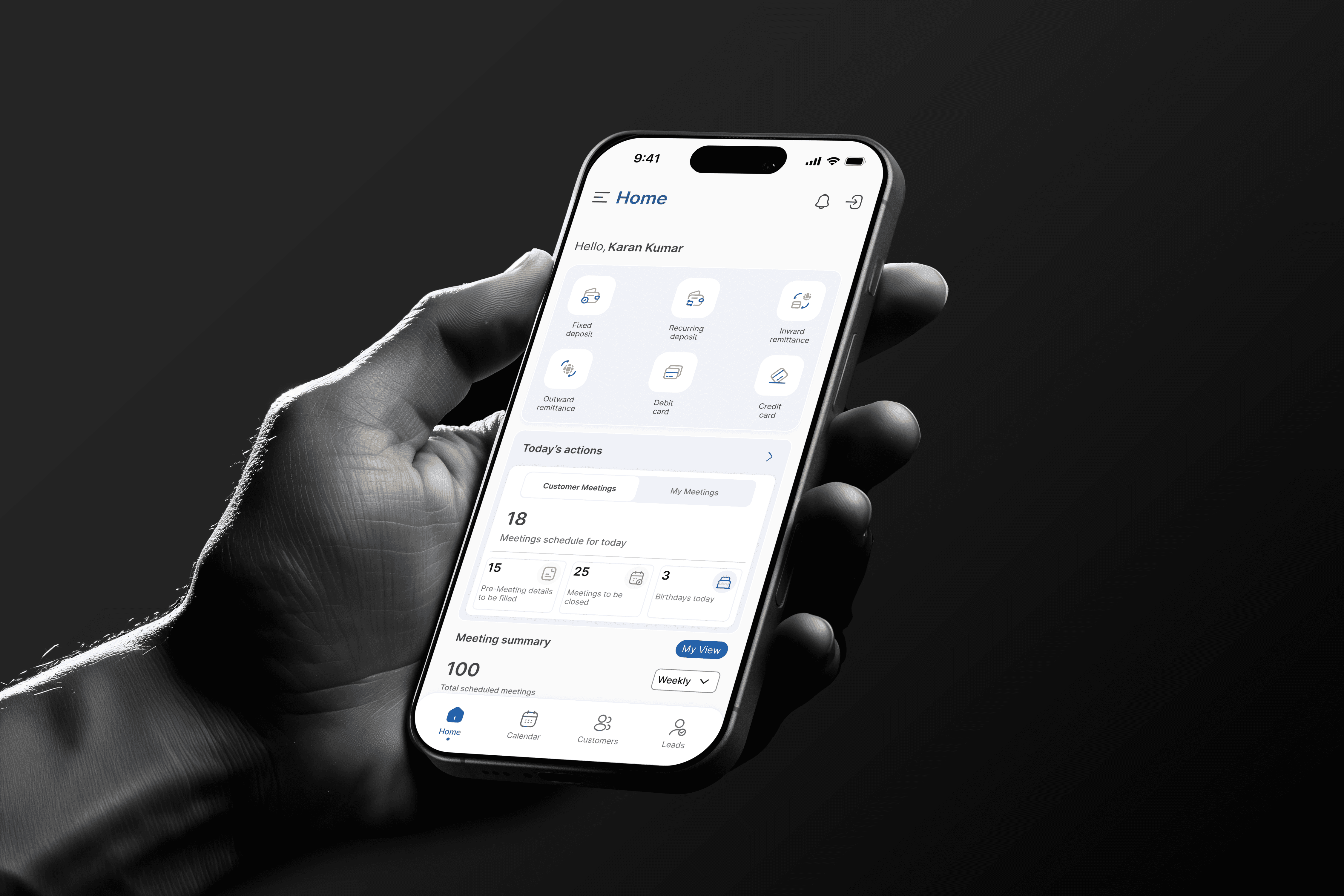
Note : Design screens have been recreated for portfolio purposes. Original confidential UI has been omitted
Note : Design screens have been recreated for portfolio purposes. Original confidential UI has been omitted
Outcomes :
The structured dual approval track system eliminated a pattern of process ambiguity that had been creating inconsistent decisions — previously, RM management and customer addition requests moved through the same informal channel with no structural distinction between them. Separating them into documented, criteria-specific workflows reduced decision errors during the pilot period [verify if you have specifics]
The "Attention Required" exception panel was cited consistently by Zonal Admins as the most immediately impactful change — several described it as the first time the platform told them what to do rather than showing them data and leaving the interpretation to them [replace with actual quote if available]
The data access restrictions at Zonal level initially received pushback from two Zonal Admin representatives who expected broader visibility. Both acknowledged during the second review session that they had not needed the restricted data in practice during the pilot — the health indicators were sufficient for their operational decisions
The CO Admin access governance module was used within the first week of rollout to adjust visibility settings for a newly onboarded regional team — a task that had previously required an IT request and a multi-day resolution cycle [verify]
Zero requests to revert to the previous manual tracking process from any admin tier after the pilot period ended
More Projects



UI / UX Design
HNI Admin Web Platform — Enterprise UX Case Study
An internal banking platform for Zonal, FGMO and CO admins overseeing HNI Relationship Managers. Covers high-stakes monitoring design, data sensitivity decisions, dual approval workflow architecture, and compliance-aware UX for wealth management.
Year :
2024
Industry :
Fintech / Wealth Management
Client :
Indian Bank
Project Overview :
The HNI Admin Web Application was designed to help administrative teams at different levels — Zonal, FGMO, and CO (Super Admin) — effectively manage and monitor Relationship Managers (RMs) handling High-Net-Worth Individual (HNI) clients.
The platform acts as a central control system that enables admins to:
Track RM performance and client engagement activities.
Review and approve RM requests, such as adding new HNI clients.
Access detailed reports and analytics to understand productivity and relationship outcomes.
Monitor regional performance, ensuring goals and compliance standards are met.
Communicate and coordinate between hierarchical levels (Zonal → FGMO → CO).
Note : This user flow is a generalized representation of the actual process. Specific steps and system details have been intentionally omitted
Note : This user flow is a generalized representation of the actual process. Specific steps and system details have been intentionally omitted
Note : This user flow is a generalized representation of the actual process. Specific steps and system details have been intentionally omitted
THE PROBLEM
Before this platform, HNI admin teams operated the same way MSME teams did — spreadsheets, email threads, manual performance tracking assembled periodically into reports. The difference is that in the HNI context, the lag between an event and an admin knowing about it carries proportionally higher cost.
Key operational failures I was briefed on:
A Zonal Admin could not see in real time whether an RM had followed up after a significant HNI client transaction — a critical window for proactive relationship management. By the time a weekly report surfaced the gap, the opportunity had passed.
RM and customer addition requests moved through unstructured approval chains with no documented criteria, no audit trail, and no visibility into where in the process a request was sitting. For high-value client additions with compliance implications, this was a structural risk.
Data about HNI clients — net worth, investment portfolios, transaction history — was accessible more broadly than required by operational need. Several features built for MSME admin contexts were initially proposed for this platform unchanged. I identified this as a problem early and pushed for a redesign of data access controls before the first screen was built.
The brief: Design a centralised platform that gives each admin tier real-time visibility into RM performance and HNI client activity — while enforcing stricter data boundaries than the MSME equivalent, and supporting two distinct approval workflows: one for RM management, one for customer list approvals.
UNDERSTANDING THE THREE ADMIN ROLES IN A WEALTH CONTEXT
The Business Analyst team conducted requirement sessions with stakeholders across all three admin levels. When I reviewed the findings, I was looking for one specific thing: how does the HNI context change what each role needs, compared to an MSME context? The answers shaped every structural decision I made.
Zonal Admin — monitoring relationship health, not just activity volume
In MSME admin, a Zonal Admin monitors RM throughput — how many clients visited, how many onboarding requests submitted, how many tasks completed. In HNI, those volume metrics are less meaningful. An RM managing 15 HNI clients might only have 3 meetings in a week — but the quality and follow-through of each one matters enormously.
Zonal Admins in the HNI context needed to monitor relationship health signals: last interaction date per client, open follow-up items, response time to significant client activity. Not counts. Conditions. I restructured the Zonal dashboard around exception-first logic — surface the clients or RMs with a gap in activity, a missed follow-up, or an unresponded alert. Everything routine stays below the fold.
FGMO Admin — managing escalation risk, not just regional comparison
In MSME, FGMO Admins compare zones by performance volume — onboarding numbers, approval rates, RM activity scores. In HNI, the comparison dimension that matters most is escalation risk: which zones have open RM requests pending too long, which have HNI client additions awaiting approval beyond acceptable timelines, which have unresolved compliance flags.
The FGMO dashboard I designed leads with an escalation queue ranked by time-at-risk, rather than a performance comparison table. Performance metrics are present — but secondary to the exception surface that drives action.
CO Admin — strategic exposure and access governance
HNI client data is more sensitive, the CO Admin role includes managing which admin users can see which data tiers — not just organisational-wide analytics. I added a data access management module to the CO view specifically for this platform, absent from the MSME equivalent.
Note : Design screens have been recreated for portfolio purposes. Original confidential UI has been omitted
Note : Design screens have been recreated for portfolio purposes. Original confidential UI has been omitted
THE DESIGN DECISIONS THAT MATTERED
Decision 1: Rebuilding data visibility from operational need, not organisational rank
The most consequential design decision on this project happened before a single screen was built — and it was a decision to push back on the initial brief.
Several features proposed for this platform assumed that admin access should mirror the organisational hierarchy: more senior role means more data visibility. As a principle for permissions architecture, this is intuitive. As a principle for data access in a regulated wealth environment, it creates exposure risk.
I challenged the default and proposed an alternative principle: data access should match operational need, not organisational rank.
A Zonal Admin's operational need is to know whether a relationship event needs attention — not what the underlying financial figures are. An FGMO Admin's operational need is to identify escalation risk at zone level — not to review individual client portfolios. Only the CO Admin has an operational case for full financial data visibility, alongside the governance responsibility that justifies it.
Working with the BA team and admin stakeholders, I mapped each role's actual operational decisions against the data required to make them. This produced a tiered visibility model:
Zonal Admins see relationship health indicators — activity status, alert response, follow-up gaps — without access to client financial data [verify specific restrictions]
FGMO Admins see zone-level performance aggregates and escalation queues, with financial data visible at a threshold level rather than in full detail [verify]
CO Admins have full data visibility plus the access governance tools to manage what lower tiers can see
All data exports at FGMO and CO level require a logged reason-for-export, creating an audit record for every data extraction event
This pushback added two weeks to the project timeline due to additional stakeholder alignment. I made the case on both compliance and design grounds — compliance because uncontrolled access to HNI financial data creates regulatory risk, design because data that isn't needed creates cognitive noise that obscures the signals that are.
Decision 2: Two approval tracks — designed as parallel systems with distinct decision logic
This platform required two entirely separate approval workflows running simultaneously, each with different criteria, different stakeholders, and different compliance implications:
Track 1 — RM Management Approvals: Requests to add, reassign, or deactivate Relationship Managers. These decisions affect every client that RM manages — a wrong assignment or a delayed deactivation in a wealth management context carries downstream risk across an entire portfolio of high-value relationships.
Track 2 — Customer List Approvals: Requests to add new HNI clients to an RM's managed portfolio. These decisions involve client eligibility criteria, KYC completion status, portfolio fit assessment, and compliance sign-off — each of which needs to be documented for regulatory purposes.
The design challenge: both tracks move through the same admin hierarchy, use the same approval stages, and appear in the same interface. Without clear structural differentiation, an admin could apply RM-management thinking to a customer addition decision — or vice versa — with consequences in either direction.
I designed them as visually parallel but informationally distinct systems. The interface pattern is identical: submitted → under review → approved / returned with reason. The decision checklists, the data surfaces at each stage, and the required documentation fields are completely different — determined by the track type, which is persistently labelled throughout every stage of the workflow. Track type is never implied by content alone; it is always explicitly stated in the screen header.
Every decision in both tracks is logged with timestamp, admin identity, role level, and a mandatory rationale field — creating a complete audit trail visible to CO Admins and available for compliance review.
Decision 3: Exception-first architecture — designing for the outlier, not the average
Every admin dashboard in this platform leads with exceptions before summaries. This was a structural choice specific to the high-consequence nature of HNI oversight.
In high-volume environments, summary metrics are the right starting point — the aggregate tells you where attention is needed. In a low-volume, high-consequence environment, summary metrics can actively obscure the problem that most urgently needs attention. An RM managing fifteen well-maintained client relationships and one at-risk one looks entirely healthy in any aggregate view — until the at-risk relationship becomes a lost one.
I designed a persistent "Attention Required" panel at the top of every admin tier's landing view. It is populated by a prioritised exception surface: delayed RM follow-ups, unanswered client activity alerts, approval requests approaching SLA breach, and flagged relationship gaps. This panel is the first thing every admin sees when they open the platform. Performance summaries, analytics, and trend data sit below it and require a deliberate scroll.
This structure was not in the original brief. It emerged from listening carefully to how Zonal Admins described their day — they were not checking summaries and then finding problems. They were looking for problems, and everything else was secondary. The interface now reflects that.
Decision 4: A dedicated access governance module for CO Admins
The CO Admin view contains a module that has no equivalent at lower tiers: a data access management interface where CO Admins can review, adjust, and audit data visibility settings across the entire admin hierarchy.
In a regulated wealth management environment, the ability to control who sees what is not just an IT function — it is a governance function that belongs in the product. Historically this required IT tickets and multi-day turnarounds. I designed it as a first-class feature of the CO Admin experience: configurable visibility tiers, role-based access logs, and an audit history of every access change with timestamp and initiating admin.
The decision to include this was mine, proposed after reviewing the CO Admin requirements and identifying that access governance was described as a pain point but not included in the original feature scope. Getting it added required a conversation with the product team about scope — a conversation I initiated because I believed the absence of it would create a compliance gap that would surface post-launch.
Decision 5: Direct-to-high-fidelity — and how I managed the risk in a compliance-sensitive product
Skipping wireframes in a compliance-sensitive enterprise product carries specific risks: workflow logic errors and data access decisions are harder to catch once stakeholders have seen polished screens and formed mental sign-offs.
I addressed this through two practices. First, I ran a dedicated data access alignment session with the CO Admin representative and the BA team before any screen design began — the output was a written agreement on data visibility per role, against which every subsequent design decision could be checked. Second, I ran separate feedback sessions per admin tier throughout the process, specifically to prevent a lower-tier admin's preferences from anchoring the design of features they don't use. Zonal Admin feedback is valid for Zonal Admin screens. It is not valid input for CO Admin access governance design.
Note : Design screens have been recreated for portfolio purposes. Original confidential UI has been omitted
Note : Design screens have been recreated for portfolio purposes. Original confidential UI has been omitted
Outcomes :
The structured dual approval track system eliminated a pattern of process ambiguity that had been creating inconsistent decisions — previously, RM management and customer addition requests moved through the same informal channel with no structural distinction between them. Separating them into documented, criteria-specific workflows reduced decision errors during the pilot period [verify if you have specifics]
The "Attention Required" exception panel was cited consistently by Zonal Admins as the most immediately impactful change — several described it as the first time the platform told them what to do rather than showing them data and leaving the interpretation to them [replace with actual quote if available]
The data access restrictions at Zonal level initially received pushback from two Zonal Admin representatives who expected broader visibility. Both acknowledged during the second review session that they had not needed the restricted data in practice during the pilot — the health indicators were sufficient for their operational decisions
The CO Admin access governance module was used within the first week of rollout to adjust visibility settings for a newly onboarded regional team — a task that had previously required an IT request and a multi-day resolution cycle [verify]
Zero requests to revert to the previous manual tracking process from any admin tier after the pilot period ended
More Projects
UI / UX Design
HNI Admin Web Platform — Enterprise UX Case Study
An internal banking platform for Zonal, FGMO and CO admins overseeing HNI Relationship Managers. Covers high-stakes monitoring design, data sensitivity decisions, dual approval workflow architecture, and compliance-aware UX for wealth management.
Year :
2024
Industry :
Fintech / Wealth Management
Client :
Indian Bank
Project Overview :
The HNI Admin Web Application was designed to help administrative teams at different levels — Zonal, FGMO, and CO (Super Admin) — effectively manage and monitor Relationship Managers (RMs) handling High-Net-Worth Individual (HNI) clients.
The platform acts as a central control system that enables admins to:
Track RM performance and client engagement activities.
Review and approve RM requests, such as adding new HNI clients.
Access detailed reports and analytics to understand productivity and relationship outcomes.
Monitor regional performance, ensuring goals and compliance standards are met.
Communicate and coordinate between hierarchical levels (Zonal → FGMO → CO).
Note : This user flow is a generalized representation of the actual process. Specific steps and system details have been intentionally omitted
Note : This user flow is a generalized representation of the actual process. Specific steps and system details have been intentionally omitted
Note : This user flow is a generalized representation of the actual process. Specific steps and system details have been intentionally omitted
THE PROBLEM
Before this platform, HNI admin teams operated the same way MSME teams did — spreadsheets, email threads, manual performance tracking assembled periodically into reports. The difference is that in the HNI context, the lag between an event and an admin knowing about it carries proportionally higher cost.
Key operational failures I was briefed on:
A Zonal Admin could not see in real time whether an RM had followed up after a significant HNI client transaction — a critical window for proactive relationship management. By the time a weekly report surfaced the gap, the opportunity had passed.
RM and customer addition requests moved through unstructured approval chains with no documented criteria, no audit trail, and no visibility into where in the process a request was sitting. For high-value client additions with compliance implications, this was a structural risk.
Data about HNI clients — net worth, investment portfolios, transaction history — was accessible more broadly than required by operational need. Several features built for MSME admin contexts were initially proposed for this platform unchanged. I identified this as a problem early and pushed for a redesign of data access controls before the first screen was built.
The brief: Design a centralised platform that gives each admin tier real-time visibility into RM performance and HNI client activity — while enforcing stricter data boundaries than the MSME equivalent, and supporting two distinct approval workflows: one for RM management, one for customer list approvals.
UNDERSTANDING THE THREE ADMIN ROLES IN A WEALTH CONTEXT
The Business Analyst team conducted requirement sessions with stakeholders across all three admin levels. When I reviewed the findings, I was looking for one specific thing: how does the HNI context change what each role needs, compared to an MSME context? The answers shaped every structural decision I made.
Zonal Admin — monitoring relationship health, not just activity volume
In MSME admin, a Zonal Admin monitors RM throughput — how many clients visited, how many onboarding requests submitted, how many tasks completed. In HNI, those volume metrics are less meaningful. An RM managing 15 HNI clients might only have 3 meetings in a week — but the quality and follow-through of each one matters enormously.
Zonal Admins in the HNI context needed to monitor relationship health signals: last interaction date per client, open follow-up items, response time to significant client activity. Not counts. Conditions. I restructured the Zonal dashboard around exception-first logic — surface the clients or RMs with a gap in activity, a missed follow-up, or an unresponded alert. Everything routine stays below the fold.
FGMO Admin — managing escalation risk, not just regional comparison
In MSME, FGMO Admins compare zones by performance volume — onboarding numbers, approval rates, RM activity scores. In HNI, the comparison dimension that matters most is escalation risk: which zones have open RM requests pending too long, which have HNI client additions awaiting approval beyond acceptable timelines, which have unresolved compliance flags.
The FGMO dashboard I designed leads with an escalation queue ranked by time-at-risk, rather than a performance comparison table. Performance metrics are present — but secondary to the exception surface that drives action.
CO Admin — strategic exposure and access governance
HNI client data is more sensitive, the CO Admin role includes managing which admin users can see which data tiers — not just organisational-wide analytics. I added a data access management module to the CO view specifically for this platform, absent from the MSME equivalent.
Note : Design screens have been recreated for portfolio purposes. Original confidential UI has been omitted
Note : Design screens have been recreated for portfolio purposes. Original confidential UI has been omitted
THE DESIGN DECISIONS THAT MATTERED
Decision 1: Rebuilding data visibility from operational need, not organisational rank
The most consequential design decision on this project happened before a single screen was built — and it was a decision to push back on the initial brief.
Several features proposed for this platform assumed that admin access should mirror the organisational hierarchy: more senior role means more data visibility. As a principle for permissions architecture, this is intuitive. As a principle for data access in a regulated wealth environment, it creates exposure risk.
I challenged the default and proposed an alternative principle: data access should match operational need, not organisational rank.
A Zonal Admin's operational need is to know whether a relationship event needs attention — not what the underlying financial figures are. An FGMO Admin's operational need is to identify escalation risk at zone level — not to review individual client portfolios. Only the CO Admin has an operational case for full financial data visibility, alongside the governance responsibility that justifies it.
Working with the BA team and admin stakeholders, I mapped each role's actual operational decisions against the data required to make them. This produced a tiered visibility model:
Zonal Admins see relationship health indicators — activity status, alert response, follow-up gaps — without access to client financial data [verify specific restrictions]
FGMO Admins see zone-level performance aggregates and escalation queues, with financial data visible at a threshold level rather than in full detail [verify]
CO Admins have full data visibility plus the access governance tools to manage what lower tiers can see
All data exports at FGMO and CO level require a logged reason-for-export, creating an audit record for every data extraction event
This pushback added two weeks to the project timeline due to additional stakeholder alignment. I made the case on both compliance and design grounds — compliance because uncontrolled access to HNI financial data creates regulatory risk, design because data that isn't needed creates cognitive noise that obscures the signals that are.
Decision 2: Two approval tracks — designed as parallel systems with distinct decision logic
This platform required two entirely separate approval workflows running simultaneously, each with different criteria, different stakeholders, and different compliance implications:
Track 1 — RM Management Approvals: Requests to add, reassign, or deactivate Relationship Managers. These decisions affect every client that RM manages — a wrong assignment or a delayed deactivation in a wealth management context carries downstream risk across an entire portfolio of high-value relationships.
Track 2 — Customer List Approvals: Requests to add new HNI clients to an RM's managed portfolio. These decisions involve client eligibility criteria, KYC completion status, portfolio fit assessment, and compliance sign-off — each of which needs to be documented for regulatory purposes.
The design challenge: both tracks move through the same admin hierarchy, use the same approval stages, and appear in the same interface. Without clear structural differentiation, an admin could apply RM-management thinking to a customer addition decision — or vice versa — with consequences in either direction.
I designed them as visually parallel but informationally distinct systems. The interface pattern is identical: submitted → under review → approved / returned with reason. The decision checklists, the data surfaces at each stage, and the required documentation fields are completely different — determined by the track type, which is persistently labelled throughout every stage of the workflow. Track type is never implied by content alone; it is always explicitly stated in the screen header.
Every decision in both tracks is logged with timestamp, admin identity, role level, and a mandatory rationale field — creating a complete audit trail visible to CO Admins and available for compliance review.
Decision 3: Exception-first architecture — designing for the outlier, not the average
Every admin dashboard in this platform leads with exceptions before summaries. This was a structural choice specific to the high-consequence nature of HNI oversight.
In high-volume environments, summary metrics are the right starting point — the aggregate tells you where attention is needed. In a low-volume, high-consequence environment, summary metrics can actively obscure the problem that most urgently needs attention. An RM managing fifteen well-maintained client relationships and one at-risk one looks entirely healthy in any aggregate view — until the at-risk relationship becomes a lost one.
I designed a persistent "Attention Required" panel at the top of every admin tier's landing view. It is populated by a prioritised exception surface: delayed RM follow-ups, unanswered client activity alerts, approval requests approaching SLA breach, and flagged relationship gaps. This panel is the first thing every admin sees when they open the platform. Performance summaries, analytics, and trend data sit below it and require a deliberate scroll.
This structure was not in the original brief. It emerged from listening carefully to how Zonal Admins described their day — they were not checking summaries and then finding problems. They were looking for problems, and everything else was secondary. The interface now reflects that.
Decision 4: A dedicated access governance module for CO Admins
The CO Admin view contains a module that has no equivalent at lower tiers: a data access management interface where CO Admins can review, adjust, and audit data visibility settings across the entire admin hierarchy.
In a regulated wealth management environment, the ability to control who sees what is not just an IT function — it is a governance function that belongs in the product. Historically this required IT tickets and multi-day turnarounds. I designed it as a first-class feature of the CO Admin experience: configurable visibility tiers, role-based access logs, and an audit history of every access change with timestamp and initiating admin.
The decision to include this was mine, proposed after reviewing the CO Admin requirements and identifying that access governance was described as a pain point but not included in the original feature scope. Getting it added required a conversation with the product team about scope — a conversation I initiated because I believed the absence of it would create a compliance gap that would surface post-launch.
Decision 5: Direct-to-high-fidelity — and how I managed the risk in a compliance-sensitive product
Skipping wireframes in a compliance-sensitive enterprise product carries specific risks: workflow logic errors and data access decisions are harder to catch once stakeholders have seen polished screens and formed mental sign-offs.
I addressed this through two practices. First, I ran a dedicated data access alignment session with the CO Admin representative and the BA team before any screen design began — the output was a written agreement on data visibility per role, against which every subsequent design decision could be checked. Second, I ran separate feedback sessions per admin tier throughout the process, specifically to prevent a lower-tier admin's preferences from anchoring the design of features they don't use. Zonal Admin feedback is valid for Zonal Admin screens. It is not valid input for CO Admin access governance design.
Note : Design screens have been recreated for portfolio purposes. Original confidential UI has been omitted
Note : Design screens have been recreated for portfolio purposes. Original confidential UI has been omitted
Outcomes :
The structured dual approval track system eliminated a pattern of process ambiguity that had been creating inconsistent decisions — previously, RM management and customer addition requests moved through the same informal channel with no structural distinction between them. Separating them into documented, criteria-specific workflows reduced decision errors during the pilot period [verify if you have specifics]
The "Attention Required" exception panel was cited consistently by Zonal Admins as the most immediately impactful change — several described it as the first time the platform told them what to do rather than showing them data and leaving the interpretation to them [replace with actual quote if available]
The data access restrictions at Zonal level initially received pushback from two Zonal Admin representatives who expected broader visibility. Both acknowledged during the second review session that they had not needed the restricted data in practice during the pilot — the health indicators were sufficient for their operational decisions
The CO Admin access governance module was used within the first week of rollout to adjust visibility settings for a newly onboarded regional team — a task that had previously required an IT request and a multi-day resolution cycle [verify]
Zero requests to revert to the previous manual tracking process from any admin tier after the pilot period ended